
A dead car battery can strike at the worst moment—midway through a winter commute or after an accidental overnight light drain. That’s where your Beatit jump starter comes in. But if it’s not charged, it won’t help. Knowing how to charge a Beatit jump starter correctly ensures it’s always ready when emergencies hit. Whether you own the G18, D11, or B7 model, this guide walks you through every step: choosing the right cable, identifying charging indicators, and avoiding common mistakes. You’ll also learn how often to charge, what power sources work best, and how to extend your device’s lifespan.
This comprehensive guide covers model-specific charging times, safety practices, and maintenance tips so your jump starter remains reliable for years. From interpreting blinking LEDs to using fast charging on the G18, you’ll gain the confidence to keep your device fully powered and emergency-ready.
Connect the Correct Charger for Your Model

Before plugging in, confirm which charging method your Beatit model supports. Using the wrong cable or power source can lead to slow charging or connection issues. Each model has specific input requirements, so match your setup accordingly.
Beatit G18: Use High-Speed Type-C Cable
The Beatit G18 QDSP 2000A charges via a high-speed Type-C port, allowing faster recharge than standard USB. Plug one end of the Type-C cable into the device and the other into a wall adapter that supports fast charging. Avoid using low-output sources like laptops, as they extend charge time. This model’s 21,000mAh battery reaches full capacity in 3–5 hours when connected to a compatible high-wattage charger. The integrated LCD screen displays real-time percentage, making it easy to track progress.
Beatit B7: Plug In With Standard USB
The Beatit B7 1200A uses a standard USB input, not Type-C. Use the included USB cable and connect it to a wall adapter for best results. Charging takes 3–5 hours from empty. While you can plug into a computer, expect longer times due to lower power output. Monitor the LED indicators—they blink during charging and turn solid when full. This model lacks an LCD screen, so rely on light patterns to assess charge status.
Beatit D11: Choose Between USB-C or AC Adapter
The Beatit D11 800A offers dual charging options: USB-C or the included AC adapter. For fastest results, use the AC adapter with a wall outlet. It delivers stable voltage and completes charging in 5–6 hours. The USB-C option works with power banks or car ports but may take longer. LED lights indicate progress—four steady lights mean 100%. Always use the original or certified cables to avoid slow or failed charging.
Monitor Charging Status by Indicator Lights
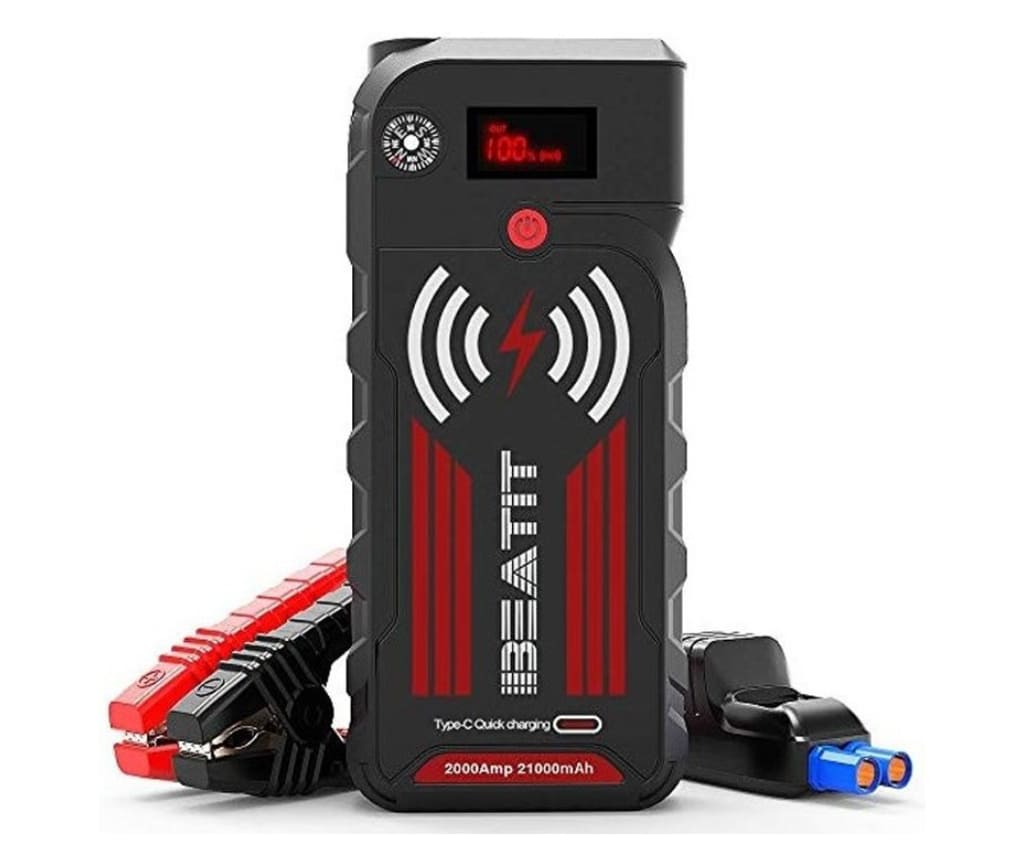
Once connected, verify that charging has started by checking the visual feedback system. Never assume the device is charging without confirmation. Indicator behavior varies between models, so understand what each signal means.
LED Light Patterns: What They Mean
Most Beatit models use LED indicators to show charge level:
• 1–2 blinking lights: Low charge (0–30%), charging in progress
• 3 blinking lights: Medium charge (30–70%)
• 4 blinking lights: High charge (70–100%), nearing full
• 4 solid lights: Fully charged (100%)
• Red or flashing red light: Connection error or faulty cable
If no lights appear, try a different cable or power source. A damaged port or incompatible adapter is often the cause.
LCD Screen on G18: Real-Time Charge Tracking
The Beatit G18 features an LCD screen that shows exact battery percentage and charging status. It updates every few seconds and stops blinking once fully charged. This precision helps you plan usage—knowing you have 60% means you can likely start a vehicle and still charge your phone. If the screen freezes or shows no response, reset the device or test with a different cable.
Troubleshoot When Charging Fails
If your jump starter isn’t charging:
• Check the cable and port for debris or damage
• Try a different power source (wall vs. computer)
• Use the original AC adapter if available
• Ensure the device is at room temperature (not frozen or overheated)
Persistent issues may indicate internal battery failure—contact customer support if all else fails.
Follow Safe Charging Practices
Charging your Beatit jump starter safely protects both the device and your home. Lithium-ion batteries are efficient but require proper handling to prevent damage or hazards.
Use Only Certified Cables and Adapters
Always use manufacturer-provided or certified compatible charging equipment. Low-quality or damaged cables can cause overheating, slow charging, or circuit damage. The G18’s fast charging only works with a proper high-speed Type-C cable. For the D11, the included AC adapter delivers optimized voltage. Substituting with unknown brands increases risk and reduces efficiency.
Avoid Charging in Extreme Temperatures
Never charge your jump starter in environments above 140°F (60°C) or below -4°F (-20°C). High heat degrades battery chemistry; freezing temperatures impair charging ability. If the device was stored in a hot car or cold garage, bring it indoors and let it stabilize before plugging in. Charge in a cool, dry, well-ventilated area—never in direct sunlight or near radiators.
Respect Built-In Safety Protections
All Beatit jump starters include overcharge, over-discharge, short-circuit, and reverse polarity protection. This means the unit stops charging automatically at 100%, so brief over-plugging is safe. However, do not leave it charging unattended for long periods. While protection circuits minimize risk, unplugging after full charge is best practice. Never charge in wet conditions—water exposure can bypass safety systems.
Maintain Battery Health for Longevity

Proper maintenance keeps your jump starter functional for years. Lithium-ion batteries degrade faster when misused, but smart habits preserve performance.
Recharge Every 3–6 Months When Unused
Even if stored, recharge your Beatit jump starter every 3 to 6 months. Lithium batteries self-discharge over time. Without periodic charging, they can fall into deep discharge, permanently reducing capacity. A unit stored at 0% may never recover. Set a calendar reminder to ensure it stays ready.
Store With 50–100% Charge
For long-term storage, charge the device to at least 50%, ideally 100%, before putting it away. Store it in a cool, dry place—not in your vehicle during extreme summer or winter months. High heat accelerates battery aging; freezing temperatures reduce performance. If stored in a trunk or glovebox, check charge levels seasonally.
Prevent Full Discharges
Avoid letting the battery drain completely. While over-discharge protection exists, frequent deep cycles shorten lifespan. After jump-starting a car or powering devices, recharge immediately. Keeping charge above 40–50% ensures peak performance when emergencies strike.
Maximize Emergency Readiness
A jump starter only helps if it’s charged and accessible. Smart habits ensure it’s always prepared for real-world use.
Keep It Charged and Stored in Your Car
For true emergency readiness, keep your Beatit jump starter fully charged and in your car. But remove it during heatwaves or winter freezes. A charged unit in your glovebox could save you from a tow. Just don’t leave it there year-round in extreme climates.
Test Charge Level Monthly
Before relying on it, test the charge monthly. Press the power button to check LED or LCD status. If below 50%, recharge it. Some users report their device “holds charge for months,” but real-world conditions vary. Testing ensures reliability.
Recharge After Every Use
Always recharge immediately after jump-starting a vehicle or using it as a power bank. Even short usage depletes significant power. A full recharge restores readiness and prevents gradual battery degradation from repeated partial cycles.
Use Power Bank Features While Charging
Many Beatit models double as power banks for smartphones, tablets, and other USB devices. The G18 includes dual USB ports and a Type-C port with QC 3.0 fast charging.
Charge Devices Safely During Recharge
You can safely charge your phone from the jump starter while it’s recharging, though this may slow the jump starter’s own charge rate. Avoid drawing heavy power (like laptops via inverter) while the unit is charging to prevent strain. Balance usage so both your devices and the jump starter remain functional.
Power Essential Gear on Road Trips
During camping or travel, use the jump starter to power essential gear. A single full charge can refill a smartphone 3–5 times. Just ensure the jump starter has enough reserve—ideally above 50%—before sharing power. This balance keeps everything ready when needed most.
Frequently Asked Questions About Charging Beatit Jump Starters
How long does it take to fully charge a Beatit jump starter?
Most models take 3–5 hours to charge from empty. The Beatit D11 requires 5–6 hours due to its charging system. The G18 supports fast charging via Type-C, reducing time significantly when using a compatible high-wattage wall adapter.
How often should I charge my Beatit jump starter if I don’t use it?
Recharge it every 3 to 6 months even if unused. Lithium-ion batteries self-discharge over time. Without maintenance charging, they can enter deep discharge, which permanently reduces capacity and may render the device unusable.
Can I use the jump starter while it’s charging?
You can safely use it as a power bank for phones or tablets while charging. However, do not attempt to jump-start a car while it’s plugged in. The device needs full power reserves for engine starts, and charging simultaneously may interfere with performance.
What should I do if my Beatit jump starter isn’t charging?
First, check the cable and power source. Try a different wall outlet or USB port. Use the original or certified cable. Ensure the device isn’t too hot or cold. If LEDs don’t respond, clean the port or reset the unit. If problems persist, contact Beatit support for assistance.
Is it safe to leave my jump starter plugged in overnight?
Yes, thanks to built-in overcharge protection, the device stops charging at 100%. However, it’s best practice to unplug it once fully charged. While safe for short over-plugging, extended connection can contribute to minor wear over time.
Can I charge my Beatit jump starter in a car?
Yes, you can charge most models using a car charger with USB output. Use a high-quality 12V adapter and ensure your vehicle’s battery is healthy. Charging in a car may take longer than from a wall outlet, especially if the alternator is not running.
Key Takeaways for Charging Your Beatit Jump Starter
To keep your Beatit jump starter reliable, follow these core practices:
• Use the correct cable and power source for your model—Type-C for G18, standard USB for B7, AC adapter for D11
• Charge every 3–6 months even when unused to prevent deep discharge
• Monitor LED or LCD indicators to confirm charging and avoid assumptions
• Store in a cool, dry place with at least 50% charge, especially during extreme seasons
• Recharge immediately after every use to maintain peak performance
By following these steps, your Beatit jump starter will stay ready for emergencies and last for years. Test it monthly, keep it charged, and always use certified charging equipment. Your peace of mind on the road starts with a fully powered device.





