
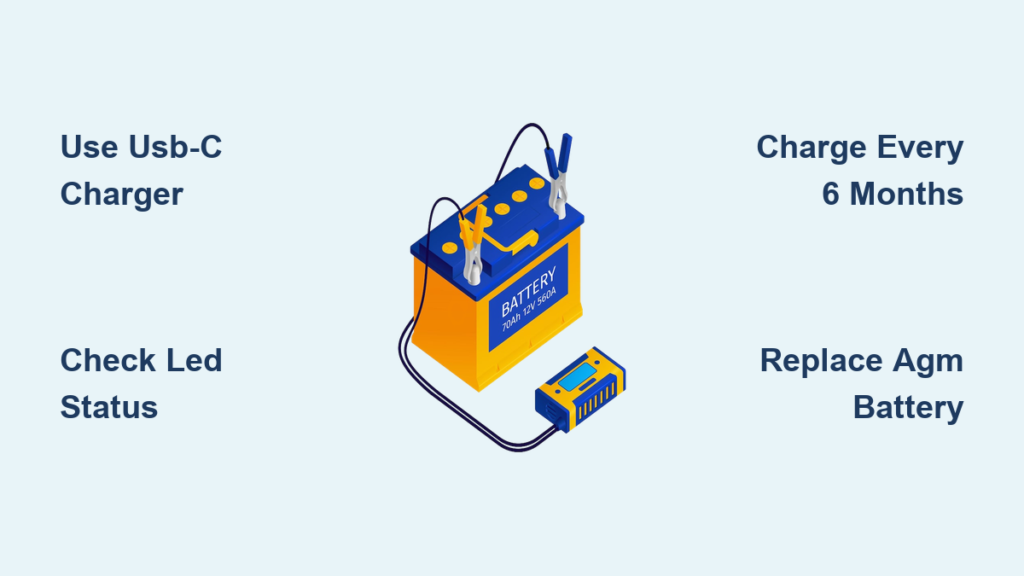
You’re stranded with a dead car battery and reach for your Vector jump starter—only to find it won’t power on. A jump starter is useless if it’s not charged, and knowing how to charge a Vector jump starter correctly ensures it’s ready when you need it most. Whether you own the modern USB-C VECTOR 1200 or an older AGM-powered model, charging methods vary significantly. This guide covers every charging option, explains LED indicators, and shares expert tips to keep your device reliable. You’ll learn how to charge safely at home, revive an old unit, and avoid common mistakes that shorten battery life.
Modern Models: USB-C Charging

Use Standard USB-C Wall Charger
The VECTOR 1200 Peak Amp Jump Starter uses a USB-C port for charging. No special adapter is needed—just use the included VJS-UC01 USB-C cable and plug it into any standard 5V USB wall adapter (like a phone charger). Connect the adapter to a wall outlet, and charging begins automatically.
Avoid low-power sources like laptop USB ports, which may not deliver enough current. A 5V/2A wall adapter is ideal for efficient charging.
Check LED for Charging Status
The LED indicator shows real-time battery status:
– Solid Red: Charging in progress
– Solid Green: Fully charged
– Blinking Red: Battery is critically low
Wait for the solid green light before disconnecting. If the light doesn’t turn on, check the cable and outlet.
Charge Time and Tips
- Full charge time: 4–6 hours from empty
- Pro tip: Always fully charge before first use, even if partially charged out of the box
- Warning: Do not leave the unit plugged in overnight—lithium-ion batteries can overheat
Older Models: AC Adapter Charging

Use Dedicated Wall Charger
Older Vector jump starters use a barrel connector and require the original 14–15V, 500mA AC adapter. Plug the adapter into a wall outlet and connect it to the device. The LED will light up:
– Red: Charging
– Green: Fully charged
Using a lower-voltage adapter may prevent charging; higher voltage can damage the internal battery.
Verify Charger Output
Ensure your charger delivers 14–15 volts at 500mA, standard for models with 17 Ah AGM batteries. This matches the charging needs of older units. If you’ve lost the original charger, search for a generic 12V battery charger with similar specs.
Avoid Long Unattended Charging
AGM batteries are sensitive to overcharging. Even with auto-cutoff, limit charging to 6–8 hours. Leaving it plugged in overnight increases the risk of overheating or battery degradation.
Alternative: Charge via Car Battery
Use 2A Battery Charger Setting
If you’ve misplaced the original charger, use a standard car battery charger on the 2-amp setting:
1. Connect red clamp to the jump starter’s positive (+) terminal
2. Connect black clamp to negative (–) terminal
3. Ensure the jump starter’s power switch is ON
This method safely charges older models and is often used to revive units that haven’t been used in years.
Fast Charge Option (Use Caution)
You can use the 10-amp setting, but only for about one hour with a manual charger. Prolonged use may overheat the battery. Smart chargers are safer—they automatically regulate voltage and prevent overcharging.
Test Before Investing
“If the unit hasn’t been charged in years, try jump-starting it with another charger before buying a replacement. Many old units still work after a proper charge.” — wrcsixeight, forum user
AutoZone and O’Reilly Auto Parts offer free battery testing—use this service to confirm if the issue is the battery or the charger.
On-the-Go Charging: Vehicle Alternator Method
Connect While Engine Runs
You can charge your Vector jump starter using your car’s alternator:
1. Turn off the vehicle.
2. Connect red clamp to the car’s positive battery terminal.
3. Connect black clamp to a grounded metal surface.
4. Start the engine.
5. Let it run for 30–60 minutes.
The alternator will slowly recharge the unit. This is a backup method—wall charging is faster and more reliable.
Cigarette Lighter Charging (Older Units)
Use Male-to-Male Adapter
Some older Vector models have a cigarette lighter receptacle for charging:
1. Buy or make a male-to-male cigarette lighter adapter.
2. Plug one end into your car’s 12V socket.
3. Plug the other end into the jump starter.
4. Turn the jump starter ON while driving.
Charging is slow—expect several hours of driving for a full charge.
Limitations
- Only works when the car’s ignition is on
- Not all models support this method
- Efficiency drops under electrical load (e.g., headlights, AC)
Use this only as a last resort.
LED Indicator Guide
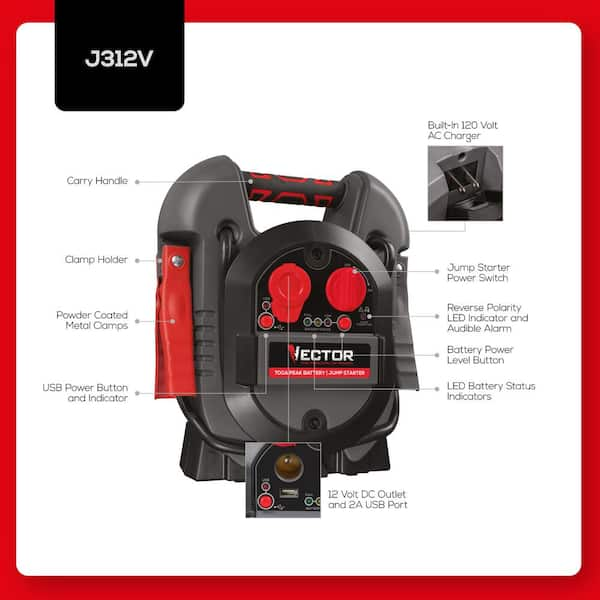
Understand Light Patterns
Your jump starter uses LED colors to communicate status:
| Light | Meaning |
|——|——–|
| Solid Red | Charging in progress |
| Solid Green | Fully charged |
| Blinking Red | Low battery—charge immediately |
| Solid Blue | Device is on and ready |
| Blinking Blue | Power bank mode active |
No Lights? Diagnose the Issue
If no lights appear when plugged in:
– Test the outlet with another device
– Try a different USB cable or adapter
– For older models, check for corroded terminals or loose connections
Clean the charging port with compressed air or a dry toothbrush if debris is present.
Charging Frequency and Maintenance
Recharge Every 6 Months
Even if unused, recharge your Vector jump starter every six months. Both lithium-ion and AGM batteries self-discharge over time. A fully drained battery can suffer permanent damage, reducing its lifespan.
Ideal Storage Conditions
- Store in a cool, dry place
- Avoid temperatures below -20°C (-4°F) or above 60°C (140°F)
- Keep away from direct sunlight and moisture
Long-Term Storage Tip
For storage longer than six months:
1. Charge to 50–70%
2. Turn off completely
3. Recharge every 6 months
This prevents deep discharge and extends battery life.
Battery Replacement (Older Models)
Replace 17 Ah AGM Battery
If your older Vector won’t hold a charge, the 17 Ah AGM battery may need replacement. These are user-replaceable and cost $25–$55.
Find the Right Replacement
Search for “12120 AGM battery”—a 12V, 17 Ah sealed lead-acid battery. It’s commonly used in older jump starters.
Steps to replace:
1. Remove screws on the bottom to open the case
2. Disconnect the old battery (note polarity)
3. Install the new battery, matching + and – terminals
4. Reassemble and test
Test Before Use
After replacement, charge fully and test by jump-starting a vehicle or using the USB power bank function.
Safety Precautions
Prevent Overheating
- Charge on a non-flammable surface (e.g., tile, metal)
- Avoid enclosed spaces with poor airflow
- Stop charging if the device feels hot
Avoid Short Circuits
- Keep clamps away from metal objects
- Never let red and black clamps touch
- Inspect cables for fraying or damage
Don’t Charge Frozen Units
If the jump starter was exposed to freezing temperatures, let it warm to room temperature before charging. Charging a cold battery can cause internal damage.
Troubleshooting Common Issues
Unit Won’t Charge
Check:
– Is the outlet working?
– Is the USB cable damaged?
– Is the charging port clean?
– For older models: Are terminals corroded?
Try a different cable or adapter before assuming the unit is faulty.
LED Stays Red Forever
If the light remains solid red after 8+ hours:
– The battery may be degraded
– The charger may be underpowered
– The unit may be overheating
Try charging in a cooler room or with a different 5V/2A adapter.
Blinking Red Light
This means the battery is critically low. Plug it in immediately. If it doesn’t start charging, the battery may need replacement.
Warranty and Support
2-Year Limited Warranty
Vector offers a 2-year warranty covering:
– Manufacturing defects
– Faulty internal components
– Malfunctioning ports or indicators
Not covered:
– Water or drop damage
– Unauthorized repairs
– Normal wear and tear
How to File a Claim
Contact Vector support with:
– Proof of purchase
– Description of the issue
– Photos or videos (if applicable)
They may offer repair, replacement, or troubleshooting help.
Maximize Device Longevity
Use Original or Compatible Parts
Always use:
– The included USB-C cable or a high-quality replacement
– A 5V/2A adapter for modern models
– A 14–15V, 500mA charger for older units
Avoid cheap chargers with unstable voltage output.
Clean Charging Port Regularly
Dust can block the USB-C port. Use a dry toothbrush or compressed air to clean it gently.
Avoid Full Discharges
Don’t let the battery drop to 0%. Recharge when you see the blinking red light or low-power warning.
Final Tips from Experienced Users
Test Battery Health Early
Before buying a new charger or battery, test the existing one. Auto stores like AutoZone offer free battery testing—this can save you money.
Find Cheap Chargers at Flea Markets
The original 14–15V charger for older models can often be found for $1–$2 at flea markets or surplus bins. Look for generic 12V battery chargers with similar output.
Use as a Power Bank Regularly
Charge your phone or tablet occasionally. This keeps the circuitry active and helps maintain battery health.
What’s Included (VECTOR 1200 Model)
When you unbox the VECTOR 1200, you should have:
• Jump starter unit
• USB-C charging cable (VJS-UC01)
• User manual
• Carabiner clip
• Safety gloves (in some kits)
Missing something? Contact Vector support with your purchase details.
Frequently Asked Questions About Charging Vector Jump Starter
Can I charge a Vector jump starter with a phone charger?
Yes, for modern models like the VECTOR 1200. Use any 5V/2A USB wall adapter and the included USB-C cable. Avoid low-power adapters (e.g., 1A) as they charge slowly or not at all.
How long does it take to charge a Vector jump starter?
Modern models take 4–6 hours with USB-C. Older AGM models take 6–8 hours with the original 14–15V charger. Charging via car battery or alternator may take longer.
Why won’t my Vector jump starter charge?
Common causes: faulty cable, dead outlet, corroded terminals, or a degraded battery. Try a different cable and outlet first. If no lights appear, the battery may need replacement.
Can I charge an old Vector jump starter with a car battery charger?
Yes. Use a 2-amp setting and connect clamps to the internal terminals. Ensure the unit’s power switch is ON. Smart chargers are safest for this method.
What does a blinking red light mean on my Vector?
A blinking red LED means the battery is critically low. Plug it in immediately. If it doesn’t start charging, the battery may be dead or the charging circuit faulty.
How often should I recharge my Vector jump starter?
Recharge every six months, even if unused. This prevents deep discharge and maintains battery health. For long-term storage, charge to 50–70% and top up every 6 months.
Key Takeaways for Keeping Your Vector Jump Starter Ready
• Modern models charge via USB-C—use a 5V/2A adapter and watch for solid green LED
• Older models need 14–15V input—use the original charger or a car battery charger on 2A setting
• Recharge every 6 months to prevent battery degradation
• Never leave charging unattended overnight
• Test battery health at auto stores before replacing parts
• Replaceable AGM battery in older units costs $25–$55 and is easy to install
• Original charger for older models: 14–15V, 500mA—often available cheaply at surplus stores
Keep your Vector jump starter charged, stored properly, and tested. When the battery dies, you’ll be the one saving the day—not waiting for help.





